
Uses Of SQL
Introduction
In this lesson, we will discuss the various uses of SQL (Structured Query Language). SQL is a domain-specific language used for managing and querying relational databases. Understanding the applications and uses of SQL is essential for database administrators, developers, data analysts, and anyone who works with data in relational databases.
What is SQL?
Before diving into its uses, let’s quickly recap what SQL is. SQL is a standard language that allows you to interact with relational databases. With SQL, you can create tables, insert records, update data, retrieve data, and perform a variety of other operations on a database.
Uses of SQL
1. Creating Databases and Tables
SQL is used for creating new databases and tables to store data. By defining the structure of your tables and specifying data types for each column, you ensure that the data is stored efficiently and accurately.
Example:
CREATE TABLE employees (
employee_id INT PRIMARY KEY,
first_name VARCHAR(50),
last_name VARCHAR(50),
email VARCHAR(100),
hire_date DATE
);
2. Querying Data
One of the most common uses of SQL is to retrieve data from a database. This is done using the SELECT statement, which can be combined with various clauses like WHERE, GROUP BY, HAVING, and ORDER BY to filter and sort the data.
Example:
SELECT first_name, last_name, email
FROM employees
WHERE hire_date > ‘2022-01-01’
ORDER BY last_name;
3. Inserting Data
SQL is used to insert data into a database table using the INSERT INTO statement. This allows you to add new records to your tables.
Example:
INSERT INTO employees (employee_id, first_name, last_name, email, hire_date)
VALUES (1, ‘John’, ‘Doe’, ‘john.doe@example.com’, ‘2023-06-29’);
4. Updating Data
When you need to make changes to existing records, you can use the UPDATE statement. This can be used to change the values in one or more columns of a table.
Example:
UPDATE employees
SET email = ‘johnathan.doe@example.com’
WHERE employee_id = 1;
5. Deleting Data
SQL allows you to delete records from a table using the DELETE statement. This is particularly useful for cleaning up data or removing obsolete records.
Example:
DELETE FROM employees
WHERE employee_id = 1;
6. Managing Database Permissions
SQL is also used for managing permissions and security in a database. You can grant and revoke privileges to different users, controlling who can read, insert, update, or delete data.
Example:
GRANT SELECT, INSERT ON employees TO hr_user;
7. Creating Views
Views are virtual tables that represent the result of an SQL query. They can be used to simplify complex queries, provide an additional security layer, or present data in a different structure.
Example:
CREATE VIEW recent_employees AS
SELECT first_name, last_name, hire_date
FROM employees
WHERE hire_date > ‘2023-01-01’;
8. Data Analysis
SQL is widely used for data analysis. By performing operations like aggregation, filtering, and joining tables, analysts can derive insights from data stored in databases.
Example:
SELECT COUNT(*), AVG(salary), department_id
FROM employees
GROUP BY department_id
HAVING COUNT(*) > 10;
Conclusion
SQL is an incredibly versatile language with a plethora of uses in database management. Whether
you are creating a database, managing data, controlling access, or analyzing data for insights, SQL is an essential tool in your arsenal. Understanding the various uses of SQL is fundamental for effectively working with relational databases.
SQL or Structured Query Language is specifically used by business professionals or program developers for administering, updating, maintaining and manipulating the databases or tables that are used for business decision-making. It is usually used to fetch data, update the contents of the table, or operate on the structure of the database or tables, using any type of database tools, which will have a user interface to apply the operations on the database. SQL can be used for both relational and multidimensional types of databases. SQL is a declarative language which means it is a programming paradigm, a style of building the structure and elements of computer programs that express the logic of a computation without describing its control flow.
Some of the famous Databases are listed below:
| Source | Common name | Full name |
| ANSI/ISO Standard | SQL/PSM | SQL/Persistent Stored Modules |
| Interbase / Firebird | PSQL | Procedural SQL |
| IBM DB2 | SQL PL | SQL Procedural Language (implements SQL/PSM) |
| IBM Informix | SPL | Stored Procedural Language |
| IBM Netezza | NZPLSQL[20] | (based on Postgres PL/pgSQL) |
| Invantive | PSQL[21] | Invantive Procedural SQL (implements SQL/PSM and PL/SQL) |
| Microsoft / Sybase | T-SQL | Transact-SQL |
| Mimer SQL | SQL/PSM | SQL/Persistent Stored Module (implements SQL/PSM) |
| MySQL | SQL/PSM | SQL/Persistent Stored Module (implements SQL/PSM) |
| MonetDB | SQL/PSM | SQL/Persistent Stored Module (implements SQL/PSM) |
| NuoDB | SSP | Starkey Stored Procedures |
| Oracle | PL/SQL | Procedural Language/SQL (based on Ada) |
| PostgreSQL | PL/pgSQL | PostgreSQL (implements SQL/PSM) |
| SAP R/3 | ABAP | Advanced Business Application Programming |
| SAP HANA | SQLScript | SQLScript |
| Sybase | Watcom-SQL | SQL Anywhere Watcom-SQL Dialect |
| Teradata | SPL | Stored Procedural Language |
Uses OF SQL
Examples given below are based on dummy table with table name “student_records” having columns id, name, address, and mobile.
Constraints: “id” is used as the primary key of the table and one more column with name “mobile” and this column contains only unique data;
-
DQL
It stands for Data Query Language. It is used to retrieve data from the database.
The SQL statement is SELECT.
Example:
SELECT * from student_records;
-
DDL
It stands for Data Definition Language. This is used to define database schema, thus it deals with the description of database schema and is used to create and modify the structure of database objects in the database. Thus the SQL statements are CREATE, DROP, ALTER, TRUNCATE, COMMENT, RENAME.
Example:
CREATE TABLE student_records

(id integer NOT NULL DEFAULT,

name character varying,

address character varying,

mobile numeric,

CONSTRAINT student_records_pkey PRIMARY KEY (id)

)

DROP TABLE student_records;

ALTER TABLE student_records ALTER COLUMN mobile character varying;
-
DML
It stands for Data Manipulation Language. It is used to store, modify, delete and update data in the database. Thus the SQL statements are INSERT, UPDATE and DELETE.
Example:
INSERT into student_records values (1,”name”,”address”, mobile);

UPDATE student_records set address = “new address” where name= “name”;

DELETE from student_records where mobile = [enter_mobile_number];

TRUNCATE table student_records;
-
DCL
It stands for Data Control Language. It is used to grant access to data stored in the database.
SQL statements are GRANT and REVOKE.
Syntax:
REVOKE privilege_name

On object_name

From {user_name | PUBLIC | role_name};

GRANT privilege_name

On object_name

To {user_name | PUBLIC | role_name}

[WITH GRANT OPTION];
**NOTE: To use GRANT command specific role_name should be created first.
-
Database Transaction Management
Transaction Management means to maintain the transaction related to the database i.e. following the basic rules for ACID properties of the database. The transaction has only two results i.e. either success or failure. Thus the SQL Statement is TRANSACTION, COMMIT, ROLLBACK, SAVEPOINT.
-
Procedures, User-defined Functions, Triggers, Indexes, and others
We can write procedures, user-defined functions, triggers, indexes, cursors as per the requirements which is nothing but SQL statements to make our work easy to meet the business requirements.
-
Reporting Purpose
SQL queries are very important from report perspective which every project have. We can write queries for standalone reports also for fetching data for the report.
-
Manual Analysis
SQL queries are very important for analysis when manual interventions are necessary. With the uses of SQL queries we can filter out the necessary data from the structured data and it could be used for analysis.
-
SQL with NTC Hosting
Even the MySQL hosting service provides the ability for the construction of big and powerful websites, web-based applications and programs. MySQL open source database solution and insist on speed, stability and scalability, then MySQL hosting solution is needed.
-
SQL Join
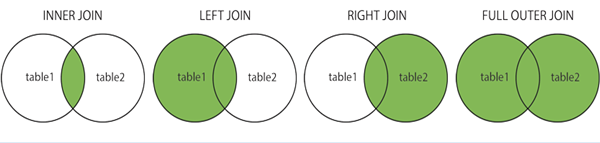
A SQL join is an instruction to combine data from two sets of data (i.e. two or more tables).
- (INNER) JOIN: Returns matching values in both tables as output.
- LEFT (OUTER) JOIN: It returns all records of the left table and the matching records of the right table as output.
- RIGHT (OUTER) JOIN: It returns all records 0f the right table, and the matching records of the left table as output.
- FULL (OUTER) JOIN: It returns all records if there is a match in either of the table i.e. left or right.
-
SQL Union:
The result-set of two or more SELECT statements can be joined by UNION.
-
SQL Wildcards:
A wildcard character is a special character in SQL which are used to substitute any other character(s) in a string.
SQL Wildcard Operators: ‘%’ and ‘_’ are called wildcards operators.
NOTE:
- % – Representing zero, one, or multiple characters in a character value ( used while filtering).
- _ – Representing a single character.
Conclusion
So it can be concluded at the end that even today with the fast-growing technologies and evolution of no SQL databases in the market, Uses of SQL still plays an important role for structured data. SQL provides flexibility of querying the tabular data with SQL queries which is a great help in many ways.