
Databases in SQL Server
- System Databases.
- User Databases.
Introduction
In this lesson, we will delve deeper into the concept of databases within the context of SQL Server. We will cover the types of databases in SQL Server, how to create and manage them, and understand the basic structure and components that make up a SQL Server database.
Types of Databases in SQL Server
System Databases
SQL Server includes several system databases that are used to manage the server and the databases that reside on the server. These include:
1. master: This database records all the system-level information for SQL Server. It includes instance-wide metadata such as logon accounts, endpoints, linked servers, and configuration settings.
2. model: This database is used as a template for all new databases created on the SQL Server instance. Any modifications made to the model database will be applied to new databases.
3. msdb: This database is used by SQL Server Agent for scheduling alerts and jobs, and for storing information regarding backups and other maintenance tasks.
4. tempdb: This database holds all the temporary tables, temporary stored procedures, and other temporary working storage needs. It is recreated every time SQL Server is restarted.
5. Resource database: It is a read-only database that contains all the system objects included with SQL Server. Users cannot directly access or modify this database.
User Databases
User databases are created by users (DBAs, developers, etc.) to store data, create tables, views, stored procedures, and other objects.
Creating a Database in SQL Server
To create a database, you can use SQL Server Management Studio (SSMS) or execute a T-SQL script. Here’s an example using T-SQL:
CREATE DATABASE MySampleDB;
This SQL script creates a new database called MySampleDB with default settings.
Database Files and Filegroups in SQL Server
Each SQL Server database has two types of files:
1. Data Files: These files store the actual data and objects such as tables, indexes, stored procedures, etc. The primary data file has an extension `.mdf` and secondary data files have `.ndf` extensions.
2. Log Files: These files store the log information used to recover the database. Log files have the `.ldf` extension.
Filegroups
Filegroups allow you to organize data files in a database. There is always a primary filegroup, and you can create additional secondary filegroups. This is useful for administrative tasks such as backup and restore operations.
Managing a Database in SQL Server
You can perform various management tasks on a SQL Server database, such as:
– Alter: You can modify an existing database using the `ALTER DATABASE` statement.
– Drop: You can delete an existing database using the `DROP DATABASE` statement.
– Backup and Restore: It is essential to regularly backup your databases. SQL Server provides options for full backups, differential backups, and transaction log backups.
Example of altering a database to modify its size:
ALTER DATABASE MySampleDB
MODIFY FILE (NAME = MySampleDB, SIZE = 100MB);
Security in SQL Server Databases
Security is a critical aspect of database management. SQL Server provides several security mechanisms:
– Authentication: Determines who can log into the SQL Server instance.
– Authorization: Controls what resources a user can access within a database.
– Encryption: SQL Server supports encrypting data at rest as well as during transmission.
– Auditing: Allows you to track and log user activity and data changes.
System Databases in SQL Server
Types of System Databases


Master Database in SQL Server
- All the system-level information for a SQL Server record by the master database.
- The dbid (database id ) of master is 1.
- The master database has SIMPLE RECOVERY MODEL.
- It is a very important database and we must have the backup.
- Without the master database the server can’t be started.
Assume the master database files are missing or inaccessible, will SQL Server start or up?
- Master database contains information about the server configuration. We can see the server configuration with the following query:
select * from sys.sysconfigures; - Master database contains information about all other databases and their location on SQL Server. We can see the information with executing the following query:
select * from sys.sysdatabases; or sp_helpdb - Master database contains information about logins in SQL Server. The following is the query by which we can see it:
select * from sys.syslogins; - Master database also contains information about users on SQL Server. The following is the query to see user details:
select * from sys.sysusers; - Master and mastlog are the logical file names of master database.
master.mdf ( data file ) and mastlog.ldf are the physical files of master database.
- SELECT name, physical_name FROM sys.database_files;

Model Database in SQL Server
- The Model database acts as a template database used in creation of new databases.
- The dbid of the model database is 3.
- By default the model database has FULL RECOVERY MODEL.
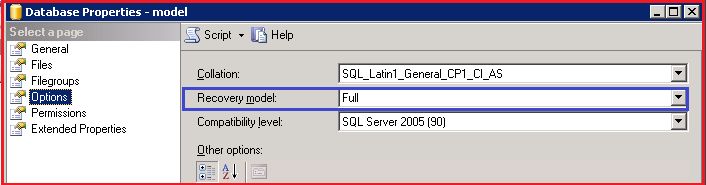
Figure 4: Recovery Model - We can take a backup of the model database.
- Modeldev and modellog are the logical file names of the model database.
- Model.mdf ( data file ) and modellog.ldf are the physical files of the model database.
- The same query can be use to see the physical file location of the model database:

- SELECT name, physical_name FROM sys.database_files;

A user has created a new database. What will be the recovery model of that database?
MSDB Database in SQL Server
- A MSDB database stores information related to backups, SQL Server Agent information, SQL Server Jobs, alerts and so on.
- The Dbid of the msdb database is 4.
- The recovery model of a msdb database is SIMPLE.
- We can take backup of a msdb database.
- MSDBData and MSDBLog are the logical file names of a msdb database.
- MSDBData.mdf (data file) and MSDBLog.ldf are the physical files of a msdb database.
- The same query can be used to see the physical file location of a msdb database:
- SELECT name, physical_name FROM sys.database_files;

TempDB in SQL Server
- It stores temporary objects, like temporary tables, temporary Stored Procedures and temporary tables to store sorting and so on.
- The dbid of a temp database is 2.
- The recovery model of a temp database is SIMPLE.
- We can’t take a backup of a tempdb.
- tempdev and templog are the logical file names of tempdb.
- tempdb.mdf (data file) and templog.ldf are the physical files of a tempdb.
- Same query can be use to see the physical file location of tempdb:
- SELECT name, physical_name FROM sys.database_files;

Why we can’t take a backup of a temp database?
How you will check to determine if the SQL Server is restarted?

- select name, crdate from sys.sysdatabases;

Resource Database in SQL Server
- It is a read-only database hidden from the user. It contains all the system objects that are included with the SQL Server.
- The Dbid of the resource database is 32767.
- The Resource database helps when we do a SQL Server upgrade.
- We can’t see the resource database in SQL Server Management Studio but we can see its database file at the OS level by the name mssqlsystemresource.mdf and mssqlsystemresource.ldf in the Binn folder of Program Files.

- Use master GO
- SELECT
- ‘ResourceDB’ AS ‘Database Name’,
- NAME AS [Database File],
- FILENAME AS [Database File Location]
- FROM
- sys.sysaltfiles
- WHERE
- DBID = 32767 GO

A data structure that stores data in memory in an organized form, along with facilitating functions such as data manipulation and effective management of data, having a particular structure that contains various tables. With each table being unique and storing data of a separate concept in the form of records represented by rows, and columns in the table representing fields, with the tables being linked to other tables through fields known as keys, is referred as the database in SQL.
Databases also provide indexes for easy access to data. Databases can be relational and non-relational depending on the type of information the user wants to store. Relational databases are those in which data is stored in the form of rows and columns in a table whereas non-relational databases do not use tabular format to store the data instead the data is stored either in graphical, document, columnar or key-value form. SQL is a relational database and hence stores the values in rows and columns format. Every column in SQL is called a field that is designed to store specific information about a record. Information/data of a single entity is stored in a record/ row having valid values of all columns. Columns have a vertical structure in SQL and rows have horizontal.
How to create a Database in SQL?
Before storing and accessing any information in a database, the first step is to create a database. The database in SQL is created by the CREATE DATABASE statement.
Syntax
CREATE DATABASE db_name;
In the above syntax, db_name is the name of the database that the user wants to give to the new database. It is necessary that the user must have admin privileges to create a new database.
Example
CREATE DATABASE employeeDB;
It will create a new database in SQL with the name employees. We can also check the above-created DB using the command given below:
SHOW DATABASES;
It will show the list of all the databases which are present in the SQL server till then.
How to Drop a Database in SQL?
Dropping a database means deleting an existing database from SQL Server. It is a good practice to delete the database that is not in use as it saves memory. DROP is a DDL command. In SQL DROP DATABASE statement is used to drop all the table that exists inside the particular database and delete that database.
Syntax
DROP DATABASE db_name;
In the above syntax db_name is the name of the database which we want to delete. One must be very careful while using the DROP command as the operations of the DROP command cannot be rolled back. Users must have admin privileges to drop the database.
Example
DROP DATABASE employeeDB;
If we try to delete a database that does not exist, SQL will show an error for the missing database which we are trying to delete. After dropping any database, we can check using the SHOW DATABASES; command and the deleted database will not be present in the list of available databases.