
Understanding Transactions in SQL Server
Transactions in SQL Server

- What a transaction is
- When to use transactions
- Understanding ACID properties
- Design of a Transaction
- Transaction state
- Specifying transaction boundaries
- T-SQL statements allowed in a transaction
- Local transactions in SQL Server 2012
- Distributed transactions in SQL Server 2012
- Guidelines to code efficient transactions
- How to code transactions
What Is a Transaction?
- Deducting money from the checking account and
Note: in the USA a checking account is like a current account in India
- Adding it to the savings account.
When to Use Transactions
- In batch processing, where multiple rows must be inserted, updated, or deleted as a single unit
- Whenever a change to one table requires that other tables be kept consistent
- When modifying data in two or more databases concurrently
- In distributed transactions, where data is manipulated in databases on various servers
Understanding ACID Properties
- Atomicity: A transaction is atomic if it’s regarded as a single action rather than a collection of separate operations. So, only when all the separate operations succeed does a transaction succeed and is committed to the database. On the other hand, if a single operation fails during the transaction then everything is considered to have failed and must be undone (rolled back) if it has already taken place. In the case of the order-entry system of the Northwind database, when you enter an order into the Orders and Order Details tables, data will be saved together in both tables, or it won’t be saved at all.
- Consistency: The transaction should leave the database in a consistent state, whether or not it completed successfully. The data modified by the transaction must comply with all the constraints placed on the columns in order to maintain data integrity. In the case of Northwind, you can’t have rows in the Order Details table without a corresponding row in the Orders table, since this would leave the data in an inconsistent state.
- Isolation: Every transaction has a well-defined boundary; that is, it is isolated from another transaction. One transaction shouldn’t affect other transactions running at the same time. Data modifications made by one transaction must be isolated from the data modifications made by all other transactions. A transaction sees data in the state it was in before another concurrent transaction modified it, or it sees the data after the second transaction has completed, but it doesn’t see an intermediate state.
- Durability: Data modifications that occur within a successful transaction are kept permanently within the system regardless of what else occurs. Transaction logs are maintained so that should a failure occur the database can be restored to its original state before the failure. As each transaction is completed, a row is entered in the database transaction log. If you have a major system failure that requires the database to be restored from a backup then you could then use this transaction log to insert (roll forward) any successful transactions that have taken place.
Design of a Transaction
- Data to be used by the transaction
- Functional characteristics of the transaction
- Output of the transaction
- Importance to users
- Expected rate of usage
- Retrieval transactions: Retrieves data from the database to be displayed on the screen.
- Update transactions: Inserts new records, deletes old records, or modifies existing records in the database.
- Mixed transactions: Involves both the retrieval and updating of data.
Transaction State
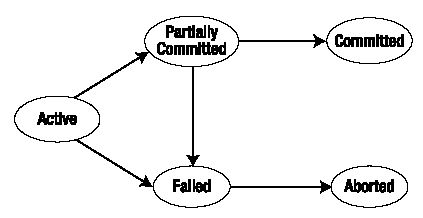
Specifying Transaction Boundaries
- Transact-SQL statements: Use the BEGIN TRANSACTION, COMMIT TRANSACTION, COMMIT WORK, ROLLBACK TRANSACTION, ROLLBACK WORK, and SET IMPLICIT_TRANSACTIONS statements to delineate transactions.
- API functions and methods: Database APIs such as ODBC, OLE DB, ADO, and the .NET Framework SqlClient namespace contain functions or methods used to delineate transactions. These are the primary mechanisms used to control transactions in a database engine application.
T-SQL Statements Allowed in a Transaction
Local Transactions in SQL Server 2012
- Autocommit Transactions Autocommit mode is the default transaction management mode of SQL Server. Every T-SQL statement is committed or rolled back when it is completed. If a statement completes successfully, it is committed; if it encounters any errors, it is bound to roll back. A SQL Server connection operates in autocommit mode whenever this default mode has not been overridden by any type transactions.
- Explicit Transactions Explicit transactions are those in which you explicitly control when the transaction begins and when it ends. Prior to SQL Server 2000, explicit transactions were also called user-defined or user-specified transactions.
T-SQL scripts for this mode use the BEGIN TRANSACTION, COMMIT TRANSACTION, and ROLLBACK TRANSACTION statements. Explicit transaction mode lasts only for the duration of the transaction. When the transaction ends, the connection returns to the transaction mode it was in before the explicit transaction was started. - Implicit Transactions When you connect to a database using SQL Server Management Studio and execute a DML query, the changes are automatically saved. This occurs because, by default, the connection is in autocommit transaction mode. If you want no changes to be committed unless you explicitly indicate so, you need to set the connection to implicit transaction mode.
You can set the database connection to implicit transaction mode by using SET IMPLICIT TRANSACTIONS ON|OFF.
After implicit transaction mode has been set to ON for a connection, SQL Server automatically starts a transaction when it first executes any of the following statements: ALTER TABLE, CREATE, DELETE, DROP, FETCH, GRANT, INSERT, OPEN, REVOKE, SELECT, TRUNCATE TABLE, and UPDATE.
The transaction remains in effect until a COMMIT or ROLLBACK statement has been explicitly issued. This means that when, say, an UPDATE statement is issued on a specific record in a database, SQL Server will maintain a lock on the data scoped for data modification until either a COMMIT or ROLLBACK is issued. In case neither of these commands are issued, the transaction will be automatically rolled back when the user disconnects. This is why it is not a best practice to use implicit transaction mode on a highly concurrent database.
- Batch-Scoped Transactions A connection can be in batch-scoped transaction mode, if the transaction running in it is Multiple Active Result Sets (MARS) enabled. Basically MARS has an associated batch execution environment, since it allows ADO .NET to take advantage of SQL Server 2012’s capability of having multiple active commands on a single connection object.
Distributed Transactions in SQL Server 2012
- Prepare phase: When the transaction manager receives a commit request, it sends a prepare command to all of the resource managers involved in the transaction. Each resource manager then does everything required to make the transaction durable, and all buffers holding any of the log images for other transactions are flushed to disk. As each resource manager completes the prepare phase, it returns success or failure of the prepare phase to the transaction manager.
- Commit phase: If the transaction manager receives successful prepares from all of the resource managers then it sends a COMMIT command to each resource manager. If all of the resource managers report a successful commit then the transaction manager sends a notification of success to the application. If any resource manager reports a failure to prepare, the transaction manager sends a ROLLBACK statement to each resource manager and indicates the failure of the commit to the application.
- Do not require input from users during a transaction.
Get all required input from users before a transaction is started. If additional user input is required during a transaction then roll back the current transaction and restart the transaction after the user input is supplied. Even if users respond immediately, human reaction times are vastly slower than computer speeds. All resources held by the transaction are held for an extremely long time, that has the potential to cause blocking problems. If users do not respond then the transaction remains active, locking critical resources until they respond, that may not happen for several minutes or even hours.
- Do not open a transaction while browsing through data, if at all possible.
Transactions should not be started until all preliminary data analysis has been completed.
- Keep the transaction as short as possible.
After you know the modifications that need to be made, start a transaction, execute the modification statements, and then immediately commit or roll back. Do not open the transaction before it is required.
- Make intelligent use of lower cursor concurrency options, such as optimistic concurrency options.
In a system with a low probability of concurrent updates, the overhead of dealing with an occasional “somebody else changed your data after you read it” error can be much lower than the overhead of always locking rows as they are read.
- Access the least amount of data possible while in a transaction.
The smaller the amount of data that you access in the transaction, the fewer the number of rows that will be locked, reducing contention between transactions.
- BEGIN TRANSACTION: This marks the beginning of a transaction.
- COMMIT TRANSACTION: This marks the successful end of a transaction. It signals the database to save the work.
- ROLLBACK TRANSACTION: This denotes that a transaction hasn’t been successful and signals the database to roll back to the state it was in prior to the transaction.
Coding Transactions in T-SQL
Try It Out: Creating a Parent-Child relationship
- Open SQL Server Management Studio, and in the Object Explorer, select our previously created database SQL2012Db, right-click and click on “New Query”.
- Enter the following SQL statement to create tables with a primary-key and foreign-key, in other words a parent-child relationship. The Person table will have a primary-key column that will be referenced by the PersonDetails table via a foreign key column as shown below here.
Listing 1-1. Create Parent-Child relationship
- create table Person
- (
- PersonID nvarchar(5)primary key not null,
- FirstName nvarchar(10)not null,
- Company nvarchar(15)
- )
- create table PersonDetails
- (
- PersonID nvarchar(5)FOREIGN KEY REFERENCES dbo.Person(PersonID),
- Address nvarchar(30)
- )
- Now click “Execute”. And it should show the status as “Command(s) completed successfully” as shown in Image 1-2 below.
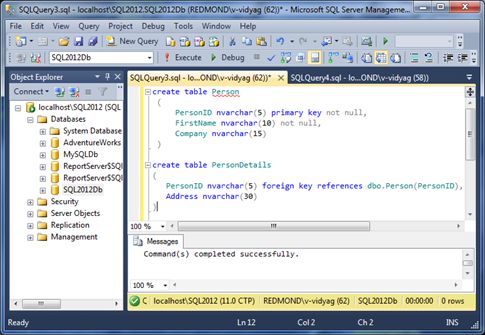
Figure 1-2. Executing the Create table statement (parent-child relationship)
- Next let’s insert some data into the Person and PersonDetails table, by executing the statement below, and click “Execute”.
Listing 1-2. Create Parent-Child relationship
- Insert into Person
- values(‘Vidvr’,‘Vidya Vrat’,‘Lionbridge Inc’),
- (‘Rupag’,‘Rupali’,‘Pearl Solutions’)
This statement should show the status “2 row(s) affected”.Since a child can have only those records that map to the parent, hence we can only insert child records into PersonDetails for those PersonIDs that are already available in the Person table.
- Insert into PersonDetails
- values(‘Vidvr’,‘Bellevue WA 98007’),
- (‘Rupag’,‘Bellevue WA 98007’)

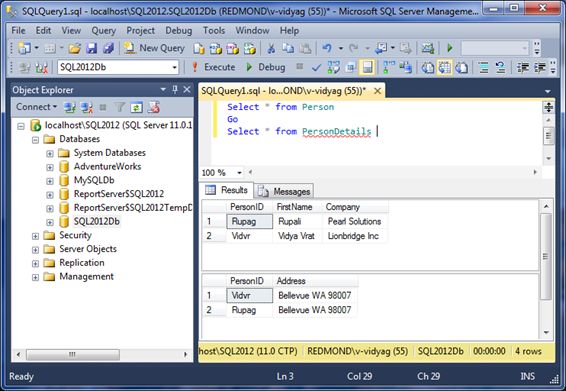
Try It Out: Coding a Transaction in T-SQL
- Here, you’ll code a transaction based on the Person and PersonDetails table, where we will use SQL Server’s primary-key and foreign-key rules to understand how transactions work. The Person table has three columns; two columns, PersonID and FirstName, don’t allow null values, and PersonID is also a primary key column. In other words only unique values are allowed. Also, the last column Company allows null values.
Similarly, the PersonDetails table is a foreign-key or child table, it has a PersonID column that is a foreign-key column and reference to Person.PersonID. It also has an Address column. The child or foreign-key table can only have those records that has a matching Primary-key column value available in the Parent or Primary-key table as shown in Figure 1-3 above, if a child record is inserted that doesn’t have a matching parent or primary ley value then it will result in an error and not insterted into the child table.
- In Object Explorer, select the SQL2012Db database, and click the New Query button.
- Create a Stored Procedure named sp_Trans_Test using the code in Listing 1-3.
Listing 1-3. spTransTest
- create procedure sp_Trans_Test
- @newpersonid nvarchar(5),
- @newfirstname nvarchar(10)
- @newcompanyname nvarchar(15),
- @oldpersonid nvarchar(5)
- as
- declare @inserr int
- declare @delerr int
- declare @maxerr int
- set @maxerr = 0
- BEGIN TRANSACTION
- — Add a person
- insert into person (personid, firstname, company)
- values(@newpersonid, @newfirstname, @newcompanyname)
- — Save error number returned from Insert statement
- set @inserr = @@error
- if @inserr > @maxerr
- set @maxerr = @inserr
- — Delete a person
- delete from person
- where personid = @oldpersonid
- — Save error number returned from Delete statement
- set @delerr = @@error
- if @delerr > @maxerr
- set @maxerr = @delerr
- — If an error occurred, roll back
- if @maxerr <> 0
- begin
- ROLLBACK
- print ‘Transaction rolled back’
- end
- else
- begin
- COMMIT
- print ‘Transaction committed’
- end
- print ‘INSERT error number:’+ cast(@inserras nvarchar(8))
- print ‘DELETE error number:’+ cast(@delerras nvarchar(8))
- return @maxerr
- Enter the following query in the same query windows as the Listing 1-3 code. Select the statement as shown in Figure 1-2, and then click “Execute” to run the query.
- exec sp_Trans_Test ‘Pearl’, ‘Vamika ‘, null, ‘Agarw’
The results window should show a return value of zero, and you should see the same messages as shown in Figure 1-4.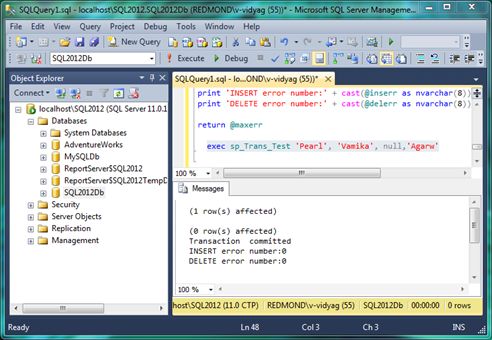
Figure 1-4. Executing the Stored Procedure in the same query window, enter the following SELECT statement:
- Select * from Person
Select the statement as shown in Figure 1-3 and then click the “Execute” button. You will see that the person named “Vamika” has been added to the table, as shown in the Results tab in Figure 1-3.
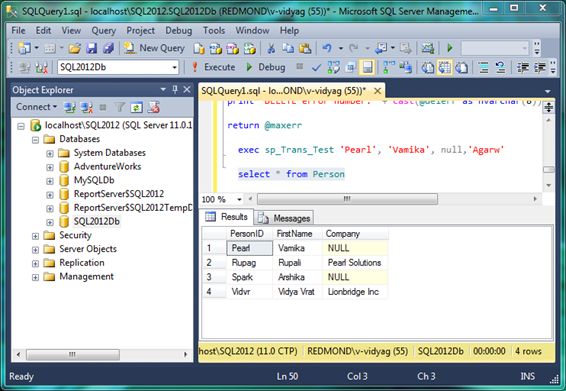
Figure 1-5. Row inserted in a transaction
- Add another person with the parameter values. Enter the following statement and execute it as you’ve done previously with other similar statements.
- EXEC sp_Trans_Test ‘Spark’, ‘Arshika ‘, null, ‘Agarw’
You should get the same results as shown earlier in Figure 1-4 in the Messages tab.
- Try the SELECT statement shown in Figure 84 one more time. You should see that person “Arshika” has been added to the Person table. Both Person “Vamika” and “Arshika” have no child records in the PersonDetails table.


- create procedure sp_Trans_Test
- @newpersonid nvarchar(5),
- @newfirstname nvarchar(10),
- @newcompanyname nvarchar(15),
- @oldpersonid nvarchar(5)
as
- declare @inserr int
- declare @delerr int
- declare @maxerr int
These local variables will be used with the Stored Procedure, so you can capture and display the error numbers returned if any from the INSERT and DELETE statements.
- BEGIN TRANSACTION
- — Add a person
- insert into person (personid, firstname, company)
- values(@newpersonid, @newfirstname, @newcompanyname)
- — Save error number returned from Insert statement
- set @inserr = @@error
- if @inserr > @maxerr
- set @maxerr = @inserr
- — Delete a person
- delete from person
- where personid = @oldpersonid
- — Save error number returned from Delete statement
- set @delerr = @@error
- if @delerr > @maxerr
- set @maxerr = @delerr
Error handling is important at all times in SQL Server, and it’s never more than inside transactional code. When you execute a T-SQL statement, there’s always the possibility that it may not succeed. The T-SQL @@ERROR function returns the error number for the last T-SQL statement executed. If no error occurred then @@ERROR returns zero.
- — If an error occurred, roll back
- if @maxerr <> 0
- begin
- ROLLBACK
- print ‘Transaction rolled back’
- end
- else
- begin
- COMMIT
- print ‘Transaction committed’
- end
Tip: T-SQL (and standard SQL) supports various alternative forms for keywords and phrases. You’ve used just ROLLBACK and COMMIT here.
- print ‘INSERT error number:’ + cast(@inserr as nvarchar(8))
- print ‘DELETE error number:’ + cast(@delerr as nvarchar(8))
- return @maxerr
Now let’s look at what happens when you execute the Stored Procedure. You run it twice, first by adding person “Pearl” and next by adding person “Spark”, but you also enter the same nonexistent person “Agarw” to delete each time. If all statements in a transaction are supposed to succeed or fail as one unit then why does the INSERT succeed when the DELETE doesn’t delete anything?
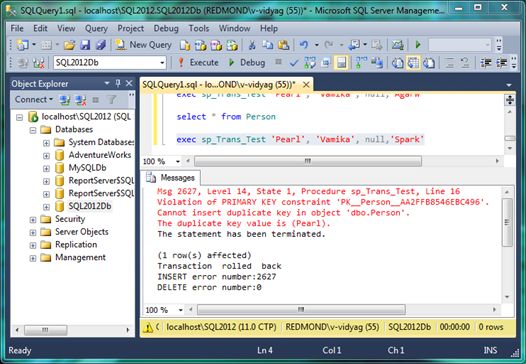
Try It Out: What Happens When the First Operation Fails
- exec sp_Trans_Test ‘Pearl’, ‘Vamika’, null, ‘Spark’
The result should appear as in Figure 1-6.
Try It Out: What Happens When the Second Operation Fails
- exec sp_Trans_Test ‘ag’, ‘Agarwal ‘,null, ‘Vidvr’
The result should appear as in Figure 1-7.
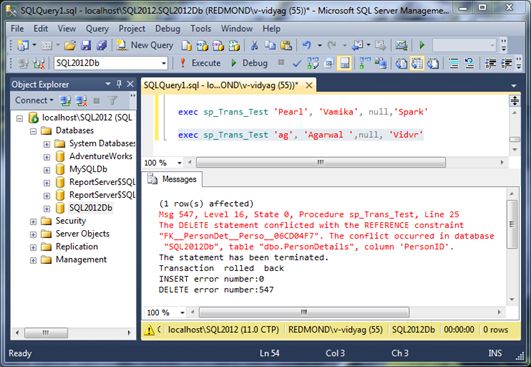
Figure 1-7. Second operation failed, first operation rolled back.
Try It Out: What Happens When Both Operations Fail
- exec sp_Trans_Test ‘Pearl’, ‘Vamika’, null,‘Rupag’
The result should appear as in Figure 1-8.
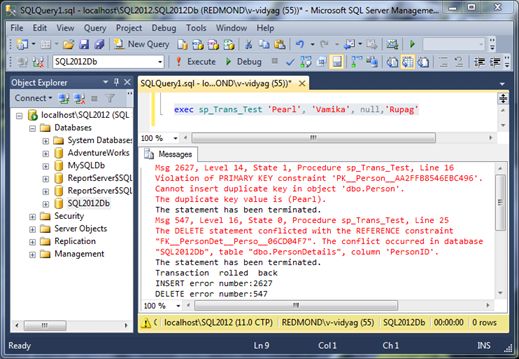
Figure 1-8. Both operations rolled back