
Creating Duplicate Table With New Name From Existing Table in SQL Server 2012
In this article, you will see how to create a duplicate table with a new name using a script in SQL Server. Suppose you have a table with 40 fields and you want to create a table with the same structure but a new name. If you create a new empty table then it will take extra time to define all the fields again. So instead we create a script of the table and replace the table name with the new name from the table script which creates a new table with the same column names, data types, and nullable settings. So let’s take a look at a practical example of how to create a script in SQL Server. The example is developed in SQL Server 2012 using the SQL Server Management Studio.
Creating the Table in SQL Server
- CREATE TABLE [dbo].[UserDetail]
- (
- [User_Id] [int] NOT NULL,
- [FirstName] [varchar](255) NULL,
- [LastName] [varchar](255) NOT NULL,
- [Address] [varchar](255) NULL
- )
Now insert data into the table. The table will look as in the following:

Creating Table Script in SQL Server Management Studio
Now Press F8 to open the Object Browser in SQL Server Management Studio and expand it.
Database -> Table then right-click then select Script Table as -> Create to -> New Query Editor Window.

- USE [master]
- GO
- SET ANSI_NULLS ON
- GO
- SET QUOTED_IDENTIFIER ON
- GO
- SET ANSI_PADDING ON
- GO
- CREATE TABLE [dbo].[UserDetail](
- [User_Id] [int] NOT NULL,
- [FirstName] [varchar](255) NULL,
- [LastName] [varchar](255) NOT NULL,
- [Address] [varchar](255) NULL
- ) ON [PRIMARY]
- GO
- SET ANSI_PADDING OFF
- GO
The above script generates a script for the UserDetail table in a new query window.
Now change the name of the table in the script to whatever you want the new table to be named.
- USE [master]
- GO
- SET ANSI_NULLS ON
- GO
- SET QUOTED_IDENTIFIER ON
- GO
- SET ANSI_PADDING ON
- GO
- CREATE TABLE [dbo].[UserDetailRecreate] — Changing the name of the above table
- (
- [User_Id] [int] NOT NULL,
- [FirstName] [varchar](255) NULL,
- [LastName] [varchar](255) NOT NULL,
- [Address] [varchar](255) NULL
- ) ON [PRIMARY]
- GO
- SET ANSI_PADDING OFF
- GO
Now Execute the script. Press F5
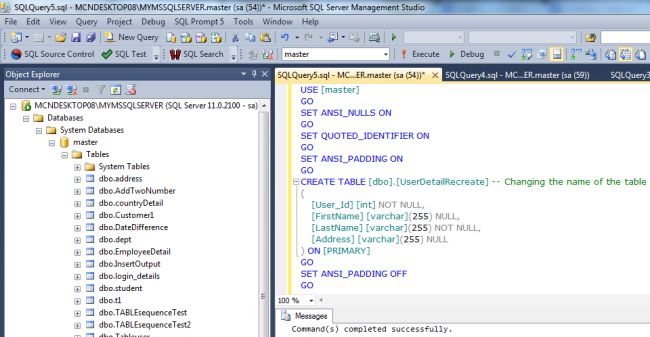
Now refresh the Master database and expand it to see the new table in the Object Explorer.
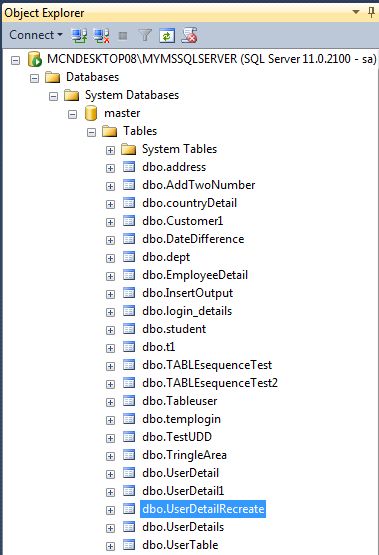
Create a Duplicate Table with New Name from Existing table programmatically
- SELECT *
- INTO [UserDetailRecreate]
- FROM [UserDetail]
- WHERE 1 = 2
Here, 1=2 will prevent the data from being copied from UserDetailto the UserDetailRecreate table.